
Microsoft Project Consulting
BSuite365 helps project managers, project management offices (PMOs), and operations teams improve Microsoft Project schedules, resource planning, reporting, and workflows. Our consulting services include schedule reviews, configuration, training, automation, and integration, with platform selection and transition support based on your organization’s requirements.

TRUSTED BY


Microsoft Project Consulting for Modern Project Management
Microsoft Project can support much more than the creation of Gantt charts. With the right configuration and processes, it can help your organization connect project information with the tools your teams already use.

Build More Reliable Project Schedules
We help you create practical schedule structures with appropriate task dependencies, milestones, and update procedures. This gives project managers a more dependable foundation for identifying schedule risks.

Improve Resource and Capacity Planning
Gain clearer visibility into who is assigned to each project and whether your organization has enough capacity for upcoming work. We can help establish workload reporting appropriate to your chosen platform.
Standardize Project Management Practices
We develop templates, views, custom fields, naming conventions, governance procedures, and reporting standards so project managers capture updates consistently and leadership can compare projects more easily.
Connect Project Information with Microsoft 365
Project information becomes more valuable when it can support decision-making. We can connect your project management processes with business systems through supported connectors and integration methods.

Select the Right Microsoft Project Platform
Different teams require different levels of scheduling, reporting, and governance. We help you evaluate Microsoft Project desktop, Planner Premium, and Power Platform-based alternatives based on your actual requirements.

Support Both Technical and Business Users
Our Microsoft Project support is designed for project managers, administrators, resource managers, executives, and team members. Each group receives the level of detail, access, reporting, and training relevant to its responsibilities.
Our Clients












































































When You Need a Microsoft Project Consultant
A Microsoft Project consultant can help when schedules are unreliable, reporting is too manual, resources are difficult to manage, or the existing platform no longer fits the organization’s needs.
Your Project Schedules Are Difficult to Trust
Your Team Has Resource Planning Problems
Your Reporting Is Too Manual
Your Project Online Environment Needs a Migration Plan
Your Microsoft Project Setup Does Not Connect with Microsoft 365
Your Project Managers Need Practical Training
Our Microsoft Project Consulting Services
We tailor the engagement to your platform and governance requirements.
-

We configure Microsoft Project environments around the way your organization plans and delivers work. Depending on the platform, this can include calendars, templates, task structures, custom fields, views, permissions, baselines, naming standards, and reporting practices.
-

We help create new schedules or improve existing ones by reviewing work breakdown structures, task durations, dependencies, milestones, constraints, deadlines, critical paths, and baselines. Schedule health checks can also identify logic gaps and practices that make forecasts unreliable.
-

We configure resource calendars, availability, assignments, and workload reporting supported by your platform. Where you need capacity visibility across multiple projects, we assess shared resource structures, consistent effort estimates, and consolidated reporting. For Planner premium plans, we distinguish workload visibility within individual plans from capacity planning across projects.
-

Our Project Online migration consulting begins with an assessment of your PWA environment, active and historical projects, reports, SharePoint project sites, workflows, resource data, permissions, and integrations. We then help evaluate Planner Premium, Project Server Subscription Edition, Power Platform, and hybrid Microsoft 365 alternatives.
-

Planner Premium brings advanced project planning capabilities into the modern Microsoft Planner experience. We assess licensing for project managers, contributors, administrators, and report viewers, including any additional requirements for Power BI, Power Automate, Power Apps, Dataverse, or third-party components.
-

For organizations that require an on-premises enterprise project management environment, we support Project Server Subscription Edition planning, configuration, enterprise custom fields, templates, permissions, governance, reporting, and optimization. Infrastructure, SharePoint dependencies, administration, and long-term support requirements should be included in the platform decision.
-

We develop Power BI reports for project status, milestones, schedule variance, resource demand, and portfolio performance. We first confirm the available data, baseline information, reporting definitions, refresh requirements, and access controls.
-

We design integrations around the selected platform’s supported connectors and APIs. For Planner premium plans, this may involve Dataverse and supported scheduling APIs. Planner basic and premium plans use different integration methods. We confirm the required operations, permissions, licensing, and platform limits before implementation.
-

We provide one-time workshops, role-based training, administrator guidance, troubleshooting, and ongoing Microsoft Project support. Training can focus on scheduling fundamentals, platform features, organizational templates, reporting procedures, resource management, or governance.
Microsoft Project, Project Online, Planner Premium, or Project Server: Which Is Right for You?
The right Microsoft project management platform depends on the complexity of your schedules. No single platform is automatically the best choice for every organization.
| Platform | Best For | Key Strengths | Important Considerations | When to Get Consulting Help |
|---|---|---|---|---|
| Microsoft Project desktop | Project managers who need detailed scheduling and individual control over complex project plans | Advanced scheduling, calendars, dependencies, baselines, critical path analysis, resource assignments, and cost tracking | Collaboration and portfolio visibility require additional processes or connected systems | When schedules are complex, inconsistent, difficult to update, or need standardized templates |
| Project Online, accessed through PWA | Existing organizations managing enterprise projects and portfolios during the transition period | Centralized project, portfolio, resource, timesheet, workflow, and reporting capabilities | Project Online retires on September 30, 2026, and should not be treated as a long-term platform for new implementations | When assessing data, dependencies, replacement options, and migration requirements |
| Planner Premium | Teams that want modern, web-based project planning and Microsoft 365 collaboration | Timeline views, dependencies, goals, custom fields, sprints, workload features, and Teams access, depending on licensing | It is not a complete one-to-one replacement for every Project Online or Project Server capability | When designing templates, governance, reporting, integrations, adoption, or a Project Online transition |
| Project Server Subscription Edition | Organizations requiring an on-premises enterprise PPM environment | Centralized scheduling, resource management, enterprise configuration, governance, and reporting | Requires SharePoint Server Subscription Edition Enterprise, supported Windows Server and SQL Server infrastructure, and ongoing administration and maintenance. | When evaluating architecture, upgrades, configuration, governance, or long-term support |
| Power Platform-based project management solution | Organizations with specialized intake, workflow, approval, reporting, or data requirements | Custom applications, Dataverse data models, Power Automate workflows, Power BI reporting, and Microsoft 365 integration | Requires solution design, governance, security planning, development, testing, and lifecycle management | When standard products do not adequately support the required business process |
Project Online Migration and Retirement Planning
Microsoft Project Online retires on September 30, 2026. Organizations still using the service should urgently complete verified data exports, preserve essential reporting records, and establish continuity arrangements. This retirement does not apply to Microsoft Project desktop, Microsoft Planner, or Project Server Subscription Edition.Organizations still using the service should prioritize verified data exports, essential reporting records, and continuity arrangements while completing their transition.

What Should Be Reviewed Before Migration?
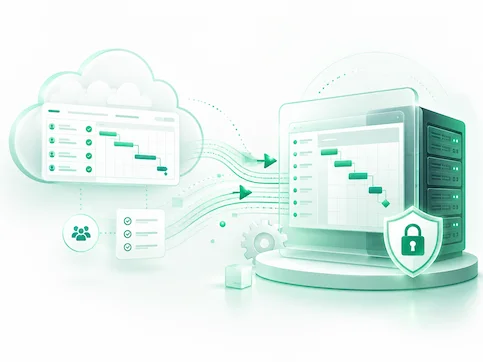
A migration assessment should examine more than active schedules.
Possible Migration Paths
Project Online does not have one universal, one-to-one replacement. The appropriate destination depends on which Project Online capabilities your organization actually uses.
Planner Premium
Planner Premium may suit teams that want modern, web-based planning, dependencies, Timeline views, goals, custom fields, workload features, and collaboration through Microsoft 365.
Project Server Subscription Edition
An on-premises Project Server environment may be considered when centralized enterprise project management is required and the organization can support the necessary infrastructure and administration.
Power Platform and Dataverse
A Power Platform solution can support customized project intake, approvals, governance, reporting, integrations, and business processes that are not fully addressed by a standard platform.
SharePoint and Teams project workspaces
Some organizations may use SharePoint and Teams for documents, communication, project registers, approvals, and lightweight tracking, with another tool handling detailed scheduling.
Hybrid Microsoft 365 model
A hybrid solution may combine Project desktop, Planner, SharePoint, Power Automate, and Power BI. Where information moves between tools, we define the authoritative source, transfer method, update frequency, and handling of conflicting changes.
How BSuite365 Can Help
We help turn the migration decision into a structured and manageable initiative. Where schedule-file import is used, we review unsupported features and any changes introduced during conversion. Timesheets, enterprise configuration, documents, permissions, and workflow records are assessed separately for retention or migration.
Our Microsoft Project Consulting Process
Our consulting process provides a clear path from the initial problem to a tested and supported solution.

Discovery and Current-State Review

Project Environment Assessment

Solution Design

Implementation and Configuration

Testing and Validation

Training and Adoption

Ongoing Support and Optimization
Microsoft Project Consulting Deliverables
Deliverables are selected according to the engagement scope.
Industries We Support
Microsoft Project can be adapted to different project types, reporting expectations, and governance environments.
Construction and Engineering
We support schedules involving design stages, procurement, contractors, approvals, construction activities, inspections, dependencies, milestones, baselines, and progress reporting. Resource and portfolio reports can also provide visibility across multiple active projects.
Government and Public Sector
We help public organizations establish structured project intake, approvals, documentation, governance, permissions, audit-conscious workflows, and consistent portfolio reporting.
Healthcare and Nonprofit
Our solutions can support program coordination, cross-department initiatives, project intake, resource planning, funding-related reporting, stakeholder collaboration, and operational project tracking.
Manufacturing and Operations
We help teams plan equipment installations, process improvements, facility projects, production changes, maintenance initiatives, resource requirements, and operational milestones.
IT and Professional Services
We support internal and client-facing delivery through project templates, resource planning, workload visibility, Teams collaboration, status reporting, automation, and executive dashboards.
Why Choose BSuite365 as Your Microsoft Project Consultant?
BSuite365 brings together project management, Microsoft 365, reporting, automation, and custom development capabilities.
Microsoft 365 and Business Workflow Expertise
We understand how Microsoft Project can work with Power BI, Power Automate, SharePoint, Teams, Excel, Dataverse, and other Microsoft 365 services. This helps create a more connected solution around your broader business processes.
Practical Implementation, Not Just Advice
We can move from assessment and recommendations into configuration, development, reporting, automation, testing, training, and ongoing support.
Custom Automation and Reporting Capability
When standard features are not enough, we can develop Power BI dashboards, Power Automate workflows, SharePoint solutions, Excel automations, and custom integrations based on the available platform capabilities.
Experience with Business and Public Sector Workflows
We understand the need for structured delivery, reliable documentation, stakeholder review, permissions, testing, maintainability, and formal reporting.
Flexible Remote Consulting
We provide remote Microsoft Project consulting and training across Canada, the United States, and other locations. Engagements can range from a focused advisory session to a longer implementation or migration project.
Related Microsoft Project and Microsoft 365 Services
Microsoft Project delivers greater value when it works as part of a connected project management environment.
Microsoft Project Integration Services
This service connects Microsoft Project with Microsoft 365 applications, reporting platforms, and other business systems, allowing information to move more efficiently between tools.
Microsoft Project Assessment
A Microsoft Project assessment provides a clear picture of the current environment, including schedules, configurations, workflows, reports, integrations, and areas that may benefit from improvement.
Microsoft Project Support and Training
Practical training and ongoing support help project managers, administrators, and team members use Microsoft Project more confidently for scheduling, reporting, administration, and day-to-day problem-solving.
Project Scheduling Services
Our project scheduling services cover the creation of new schedules and the improvement of existing ones, including task structures, dependencies, milestones, calendars, baselines, and templates.
Project Accelerator Consulting
We assess and customize the Project for the web Accelerator for suitable Planner Power App and Dataverse environments, including project intake, risks, issues, and reporting. We confirm compatibility, licensing, and the support arrangements for both the core Accelerator and any customizations included in the engagement.
Project Online Migration Support
Project Online migration support provides a structured path for retaining important data, selecting a suitable replacement platform, rebuilding reports, and preparing users for the transition.
Project Online Integration Services
This service reviews the reports and business systems that currently depend on Project Online. We assess each integration to determine whether it should be retired, rebuilt, or reconnected to the replacement platform, identifying reusable components where appropriate.
Planner Premium Consulting
Planner Premium consulting covers platform configuration, plan templates, reporting, governance, and user adoption based on the way each organization manages its projects.
Power BI Consulting
Power BI consulting turns project data into clear, interactive dashboards for monitoring schedules, resources, milestones, project health, and portfolio performance.
Power Automate Consulting
Power Automate consulting reduces repetitive administrative work through automated project intake, approvals, notifications, document processes, and other recurring workflows.
SharePoint Consulting
SharePoint consulting provides organized project workspaces for documents, risks, issues, decisions, permissions, and other important project information.
Microsoft Teams Consulting
Microsoft Teams consulting brings project conversations, meetings, plans, documents, and reports together in a structured collaboration environment.
Microsoft 365 Consulting
Microsoft 365 consulting creates a more connected environment for collaboration, reporting, workflow automation, information management, and governance.
what our clients say about BSuite365?

I have been working with BSuite365 team on various projects over the last 4 years. It started with a complex mathematical problem and a simple spreadsheet. Their team always surprises me with their skills and passion for their work. They really work hard to ensure projects meet the business criteria and solve the business problems they need to. I will continue working with them to improve the business systems of our company.

Working with Sajad and his team at BSuite365 has been an easy and pleasant experience. The solution they built for us will save us dozens of hours of labour costs several times a year and has been well worth what we paid. I can easily recommend them and will not hesitate to work with them again in the future.

Sajad and his team have been extremely helpful in meeting our website needs. They listen to what your vision is and not only work around it, but help to flesh it out. I would highly recommend Sajad and BSuite365 to anyone with Technology needs.

At Persephone Brewing we utilize a number of systems to manage and report our data. BSuite365 System helped us streamline these processes by automating several business processes using our existing data sets saving us hundreds of hours a year at a very reasonable cost.
