
Excel PowerPoint Automation Services
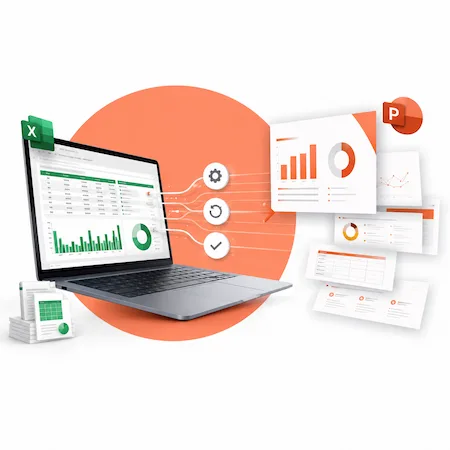
We help teams generate accurate, branded PowerPoint presentations from structured Excel data, reducing manual copy-paste work and improving consistency across recurring reports. This saves time, reduces reporting errors, and keeps executive, finance, client, and management presentations aligned with the latest data.

TRUSTED BY


Business Challenges We Solve
A lot of reporting problems don’t come from bad tools, but from having to manually move data between Excel and PowerPoint over and over again. These are the issues we see most often.
Our Excel–PowerPoint Automation Services
Depending on your reporting workflow, we can build one-click report generators, branded PowerPoint templates, and Microsoft 365-based distribution processes.

Automated Slide Creation from Excel Dashboards
We build workflows that generate PowerPoint slides from structured Excel dashboards, tables, charts, and KPI ranges. Instead of starting from a blank deck each time, the presentation is generated using your existing data structure.
Dynamic Updates for Charts, Tables, and Text
Depending on the setup, PowerPoint slides can be refreshed from Excel using linked charts, VBA-driven updates, or controlled refresh workflows. We design the workflow so that updates are appropriate for your environment.

Branded PowerPoint Templates That Stay Consistent
We apply your PowerPoint templates so fonts, colors, and layouts stay consistent every time a deck is generated. This removes the need to fix formatting after the fact and keeps presentations aligned with brand standards.

Recurring Executive or Client Reporting
For weekly, monthly, or quarterly reports, automation takes care of the heavy lifting. Reports can be regenerated on demand, making it easier to respond to last-minute requests without rebuilding everything from scratch.
Custom Dashboards and KPI Presentations
We also help turn Excel-based KPIs into clear, repeatable PowerPoint presentations. The focus is on making results easy to read and reuse, rather than creating one-off decks that can’t be updated later.
Our Clients







































































Automation Capabilities
We specialize in practical Excel and PowerPoint automation for real business reporting environments — including complex workbooks, recurring executive decks, branded templates, and Microsoft 365 workflows.
Technology Stack
We choose the technology based on where the report needs to run: desktop Excel and PowerPoint, SharePoint/OneDrive, Teams, or a hybrid Microsoft 365 environment.
Excel VBA
Used to control and automate complex Excel logic, especially in existing workbooks that already rely on macros. This is often the most practical option for teams with established Excel-based reporting.
Desktop vs Cloud Workflow Planning
Advanced slide automation often runs best in desktop Office, while Microsoft 365 handles cloud workflows, approvals, notifications, and file management.
PowerPoint VBA
Allows slides, charts, and layouts to be created and updated programmatically. This is what makes repeatable, data-driven presentations possible without manual edits.
Office Scripts
A more modern alternative for Excel automation in Microsoft 365. Useful for cloud-based Excel-side workflows where files live in SharePoint or OneDrive and need to run without someone opening them.
Power Automate
Handles workflows around the automation, such as triggering report generation, moving files, or sending notifications when reports are ready.
Microsoft 365 Ecosystem
All automation is designed to work within Microsoft 365 tools teams already use, so reporting, storage, and sharing stay connected and familiar.
Our Automation Process
We follow a straightforward process that focuses on how your reports actually work today, not how they look in theory.
Discovery
We start by understanding how your current reporting process works, where the manual effort is, and what’s causing the most frustration.
Excel Data Review
We look at the Excel files that drive your reports to make sure the data is structured in a way that supports automation.
Template Design
PowerPoint templates are set up or refined so slides follow your branding and layout standards.
Automation Build
Based on the setup, we build the automation using VBA, Office Scripts, Power Automate, or a combination of tools.
Testing
Reports are tested against real data to make sure numbers, charts, and layouts update correctly.
Deployment & Documentation
We deliver solutions that your team can actually run and reuse. Documentation is included so future updates don’t depend on guesswork or tribal knowledge.
Support & Optimization
After delivery, we help with fixes, improvements, and adjustments as reporting needs change over time.
Use Cases by Function
These are common ways different teams use Excel–PowerPoint automation in day-to-day work.
Executive & Management
Finance & Operations
Sales & Marketing
Benefits of Excel–PowerPoint Automation
The value shows up in a few different ways, from day-to-day time savings to longer-term improvements in how reports are created and used.
Why Choose Us
We focus on building automation that’s actually useful day to day, not just impressive in a demo.
Deep Excel & PowerPoint Expertise
We understand the realities of Excel-based reporting: inconsistent workbook structures, last-minute data changes, and presentation templates that need to stay editable.
Business-First Approach
The goal isn’t automation for its own sake. We start with what the business needs to deliver—reports, decks, and updates—and design solutions around those outcomes.
Maintainable Workflows
Automation is built to be reused and adjusted over time. As reports change or new ones are added, the workflows can scale without needing a full rebuild.
Documentation & Training
Clear documentation and walkthroughs are included so your team understands how everything works and isn’t left guessing after handoff.
Confidentiality & Compliance
We work with sensitive business data and follow enterprise standards for security, access control, and confidentiality throughout the project.
Engagement Models
We offer a few ways to work together, depending on the scope of automation and how ongoing your reporting needs are.
