
MCE2 Excel Application Modernization for Natural Resources in Canada
Natural Resources Canada’s Material Carbon Emissions Estimator (MCE2) helps users estimate material carbon emissions and operational greenhouse gas emissions for low-rise residential projects. Since 2021, BSUITE365 has enhanced and maintained this established Excel application by adding scenario comparison, improving calculations, updating product data, strengthening bilingual functionality, and improving reporting, performance and reliability.
Project Summary
Client
Natural Resources Canada
Application
Material Carbon Emissions Estimator—MCE2
Industry
Government Sustainable constructionBuilding science
Platform
Engagement
Application modernization EnhancementOngoing support
Languages
English French
Timeline
Primary Users
Homebuilders, designers, energy advisors and building-industry professionals
Overview of the MCE2 Excel Application Modernization
Although BSUITE365 did not develop the original MCE2 workbook, our role has been to modernize and extend the existing Excel application for Natural Resources Canada while preserving its established calculation framework. The engagement has included feature development, formula improvements, construction-product data updates, bilingual implementation, reporting enhancements, performance optimization, testing and ongoing maintenance.
Collaboration with Builders for Climate Action
MCE2 was originally co-developed by Natural Resources Canada and Builders for Climate Action. During our modernization work, Builders for Climate Action provided subject-matter guidance on the workbook’s existing logic, supplied information about new construction products and identified products that had been archived. BSUITE365 translated that guidance into workbook updates, including related formulas, references, selection lists and testing.
The Challenge: MCE2 Excel Modernization Without Breaking Calculations
MCE2 was already a calculation-intensive application with interconnected formulas, VBA processes, construction-product data, charts and HOT2000 imports. A change in one area could affect calculations or outputs elsewhere in the workbook. The central challenge was therefore to introduce new calculations, scenario comparison, bilingual support, updated product data and clearer reporting while protecting the application’s existing dependencies, performance and reliability.
Results: A More Capable and Maintainable Excel Application
Through ongoing modernization, MCE2 provides Natural Resources Canada with a more flexible and dependable Excel application that can evolve alongside changing calculation requirements, construction-product data and user needs.
The improvements help users evaluate design alternatives more efficiently, interpret carbon estimates more clearly and complete key workflows with less manual handling. Consistent bilingual functionality also provides English and French users with access to the same features and results.
For Natural Resources Canada, the modernized and continuously tested application provides a stronger foundation for future enhancements, dataset updates and releases.
Calculate Project Results
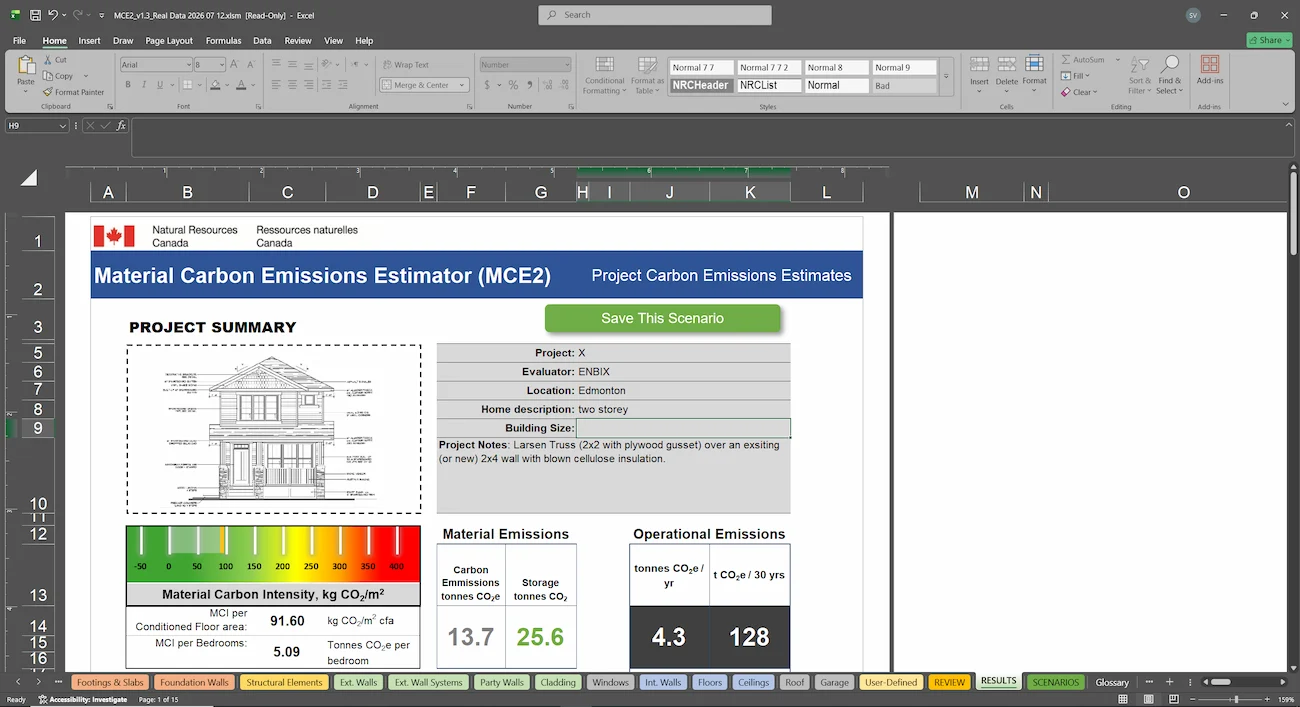
MCE2 combines project information, building quantities and selected products to estimate material carbon emissions for individual assemblies and the overall project. It presents gross emissions, carbon storage, net emissions and estimated operational emissions through summaries and charts.

How MCE2 Works
MCE2 guides users through a clear process—from importing project information and selecting building materials to calculating results and comparing design options.
Compare Design Alternatives
Users select materials for key building components, including foundations, walls, windows, floors, roofs and cladding. Each area has a dedicated worksheet with clearly identified input sections and instructions to help users enter the required information.
Define Building Materials
Users select materials for key building components, including foundations, walls, windows, floors, roofs and cladding. Each area has a dedicated worksheet with clearly identified input sections and instructions to help users enter the required information.
Import Project Information
Project setup begins in the User Input worksheet, where users can import an H2K file created in Natural Resources Canada’s HOT2000 software. This reduces duplicate data entry and provides a consistent starting point before users add or confirm details such as the project location and building description.

Quality Assurance
Because MCE2 performs complex technical calculations, every update must be carefully tested to protect the accuracy and reliability of the application. Our quality-assurance process includes:
